Culvert is highly skewed, want to run 3D analysis
1. midas civil 설치경로 지정방법 2. 3d해석 수행을 위한 프로그램 옵션설정 방법에 대해 문의드립니다
안녕하세요. 한길아이티입니다. midas에서는 프로그램외부에서의 해석을 지원하지 않으므로 자동실행되지는 않으며 input을 생성 midas에서 해석후 output을 생성하여 읽어들여야 합니다. 3D Plate해석을 위한 설정은 구조계산 - 설계조건 - 설계환경에서 가능하며 관련 FAQ를 첨부하니 참고하시기 바랍니다. http://www.aroad.co.kr/customer/sub01_01_view.asp?tname=p_faq&page=1&curref=905&curstep=0&curlevel=0&idx=1145&main_category=2_1&sub_category=2_1_9&end_category=2_1_9_4&lv4_category=2_1_9_4_7&key=total&keystring=midas&num=905 http://www.aroad.co.kr/customer/sub01_01_view.asp?tname=p_faq&page=1&curref=1104&curstep=0&curlevel=0&idx=1344&main_category=2_1&sub_category=2_1_4&end_category=00&lv4_category=00&key=total&keystring=midas&num=1104 감사합니다.
Follow-up2013-06-11 19:36
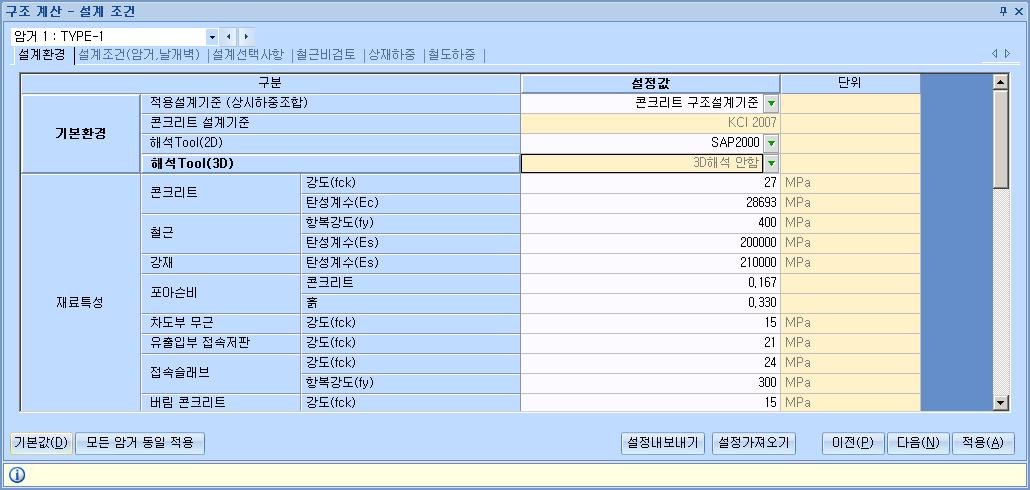
1. 첨부한 사진과 같이 환경설정에서 3d해석 안함으로 되어있어 3d해석을 활성화 할 수 없습니다 2. culvert에서 mct파일 생성은 가능한가요?
안녕하세요. 한길아이티입니다. 3D Plate해석은 ACulvert Standard 버전에서 지원하고 있습니다. 올려주신 캡쳐로 보아 Basic 버전이 아닌가 싶습니다. 또한 U-Type은 3D Plate해석을 지원하지 않고 있으므로 참고하시기 바랍니다. 이전에 답변드린대로 mct파일 생성후 midas에서 해석하여 anl형태의 결과파일을 읽어들이는 순서로 해석이 진행됩니다. 감사합니다.
Attachments on this post were deleted after the retention period (3 years after the last answer) and can no longer be downloaded. If you need the same material, please contact us.
Sign in to ask